

Brevo
To setup Brevo to be used as an Email Service Provider in EmailElement, you will need:
- At least 1 Email Domain configured and verified
- Your API Key for Brevo
Generate API Key
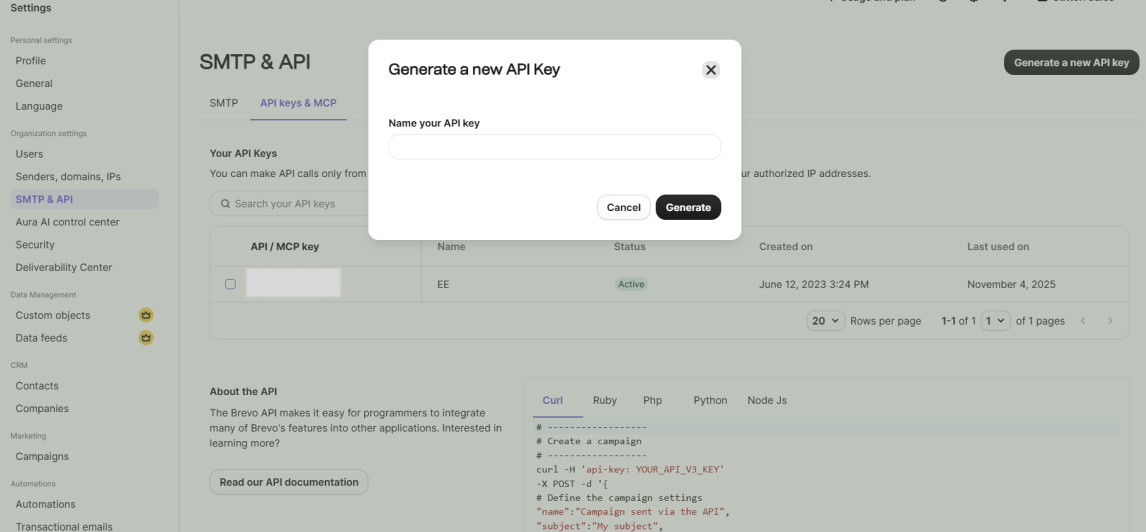
- Select SMTP & API from the same Settings panel, then select the “API keys & MCP” tab
- Select “Generate a new API key” and follow the prompts to create your key, being sure to save the key somewhere to paste it into EmailElement later.
Setup Brevo Integration in EmailElement
- In the EmailElement portal, go to Send Integrations/Create Send Integration
- Select Brevo
- Enter your Integration Name, Sender Domain, and the API Key you just generated
- Save the integration and click “Run Test”
- You're ready to start sending with Brevo and EmailElement!