

SMTP2GO
To set up a Smtp2Go Send Integration, an API key is required.
Create API Key
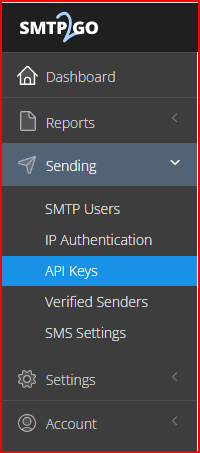
Navigate to the API Key section of Smtp2Go
Permissions
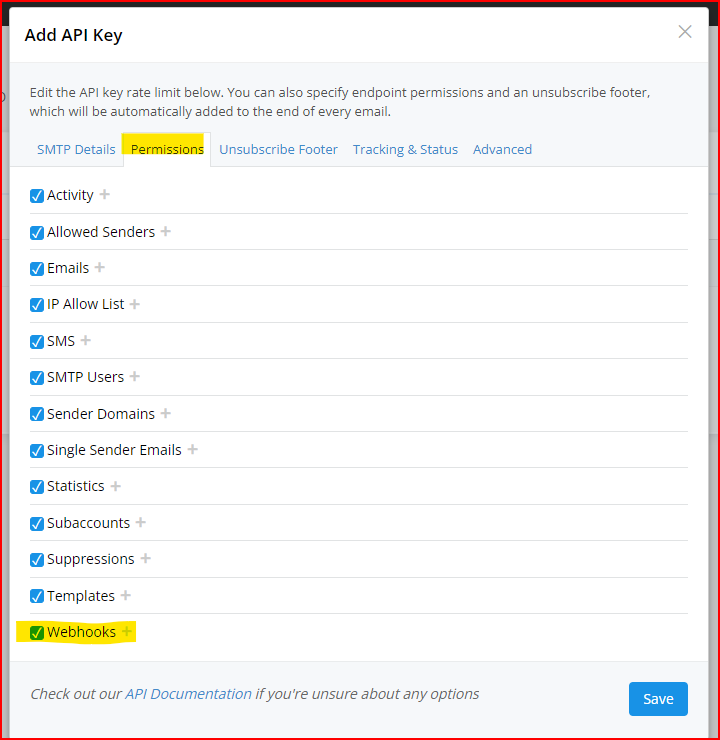
Under the Permissions tab, allow Webhook permissions to your API key
Set Up SMTP2GO in EmailElement
- Go to Send Integrations and click Create Send Integration.
- Choose the integration type, pick SMTP2GO from the list, and click Next.
- Enter a name for the integration.
- Select one or more sender domains. A validated domain carries a green tick and is ready to send from.
- Enter the API key you created.
- Custom Headers are optional, and go on every email this integration sends.
- Click Create.
Test the Integration
- Click Run Test on the integration.
- The result is reported for each sender domain on it.
- One domain succeeding is enough for the integration to go active.
Troubleshooting
| Issue | Solution |
|---|---|
| Authentication failed | Check the credentials are correct and still active in SMTP2GO. |
| Domain not verified | The sender domain has to be verified in EmailElement and in SMTP2GO. Check its SPF and DKIM records. |
| Run Test fails for one domain | That domain is not set up in SMTP2GO. Check it there, and check its DNS records. |
| Nothing recorded in Delivery Events | The API key is missing Webhook permission. Add it under the Permissions tab, then save the integration again. |