
Yahoo Feedback Loop
Where it is
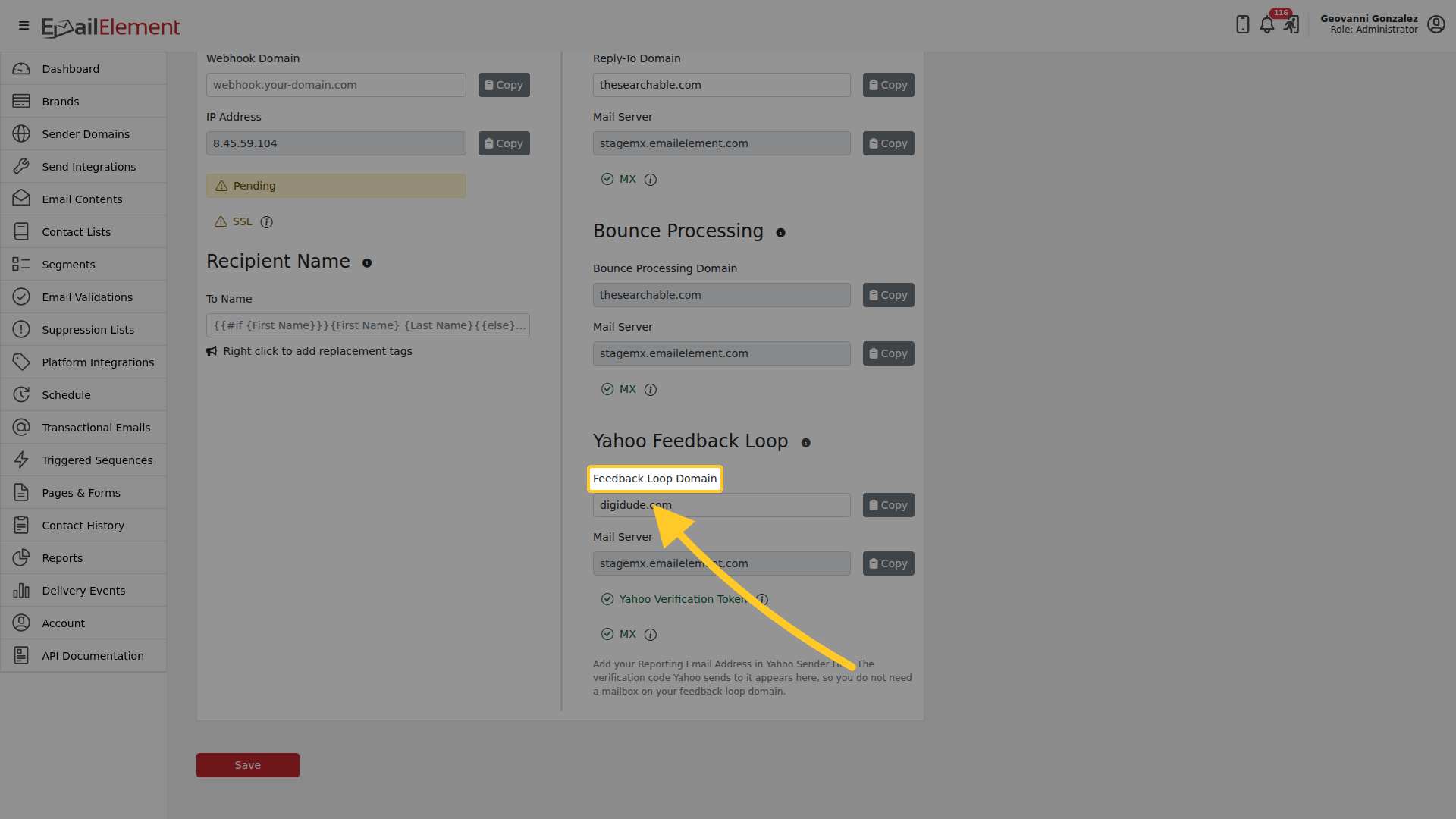
On a sender domain, open Advanced and scroll to Yahoo Feedback Loop. It is the last block on that panel.
Setting it up
- Enter a Feedback Loop Domain and save. It does not have to be the sending domain.
- Point an MX record on that domain at the mail server shown beside the field.
- Add your Reporting Email Address in Yahoo Sender Hub.
- Yahoo sends a verification code to it. The code appears on this page, so you do not need a mailbox on the feedback loop domain at all.
Two checks report when it is working: Yahoo Verification Token and MX. Both go green when the code has arrived and the MX record resolves.
Related pages
- Sender Domain Advanced Options — the rest of that panel
- Sender Domains — creating and verifying a domain
A feedback loop (FBL) is how a mailbox provider tells a sender that a recipient marked one of their emails as spam. Yahoo sends each complaint as a report to a reporting email address the sender registers with Yahoo Sender Hub. Once a sender domain is enrolled, EmailElement receives those reports, records a Complained delivery event, and adds the contact to the account suppression list, so the complainer is not emailed again.
Yahoo is the only feedback loop provider EmailElement supports today.
Before starting
- A Yahoo Sender Hub account (https://senders.yahooinc.com). Yahoo issues the verification token to the Sender Hub account that enrolls the domain, so whoever owns that account has to do the enrollment.
- A sender domain already created in EmailElement.
- A subdomain to receive the reports, for example fbl.your-domain.com. It is used for nothing else, and its mail is delivered to EmailElement.
Setup
Follow the steps in this order.
| Step | Where | What to do |
|---|---|---|
| 1 | Yahoo Sender Hub | Add the sender domain and copy the verification token Sender Hub issues for it. |
| 2 | DNS provider | Publish the token on the sender domain as a TXT record in the form yahoo-verification-key=TOKEN. |
| 3 | EmailElement | Open the sender domain, expand Advanced, enter the subdomain in Feedback Loop Domain, and click Save. Copy the read-only Mail Server value shown under the field. |
| 4 | Yahoo Sender Hub | Set the reporting email address to an address at the feedback loop domain, for example fbl@fbl.your-domain.com, and complete Yahoo verification of it. Yahoo emails a verification code to that address, so do this while the feedback loop domain still delivers to a mailbox the user can read. |
| 5 | DNS provider | Once the reporting address shows as verified in Sender Hub, add an MX record on the feedback loop domain pointing at the mail server from step 3. |
| 6 | EmailElement | Open the sender domain and click Validate DNS Records. |
EmailElement does not store or forward the Sender Hub verification email, so a code sent after the MX record is switched over cannot be read back. If that happens, point the MX record back at a mailbox the user can read, ask Yahoo to resend the code, and switch the MX record over again afterwards.
Statuses
Both statuses sit in the Yahoo Feedback Loop section. They read Pending until the sender domain is validated, then Success or Failed.
| Status | What it checks |
|---|---|
| Yahoo Verification Token | The sender domain publishes a yahoo-verification-key TXT record. Any token counts, because Yahoo issues it to your Sender Hub account. |
| MX | The feedback loop domain has an MX record pointing at the EmailElement mail server. This is separate from the MX under Mail Exchange, which covers reply-to email and bounces. |
What happens when a complaint arrives
- A Yahoo recipient marks a message sent from the sender domain as spam.
- Yahoo sends a complaint report to the reporting email address, which the feedback loop domain MX delivers to EmailElement.
- EmailElement matches the report back to the send it came from, records a Complained event visible in Delivery Events, and adds the contact to the account suppression list.
Only complaints Yahoo raises after the enrollment is finished are reported. Earlier complaints are not backfilled.
Troubleshooting
| Symptom | Cause | Fix |
|---|---|---|
| Yahoo Verification Token is Failed | The TXT record is missing, was published on the feedback loop domain instead of the sender domain, or has not propagated yet. | Publish yahoo-verification-key=TOKEN on the sender domain, then validate again once DNS has propagated. |
| MX is Failed | The feedback loop domain has no MX record, points somewhere else, or shares its lowest preference number with another host. | Point the MX at the mail server shown on the form and make sure it is the only record at the lowest preference number. Senders pick at random between records that tie, so most of the reports would go to the other host. |
| Both statuses stay Pending | The sender domain has not been validated since the fields were filled in, or the feedback loop domain was typed in but not saved, which greys the button out. | Save the sender domain, reopen it, and click Validate DNS Records. |
| No complaints ever arrive | Yahoo has not verified the reporting email address, or no Yahoo recipient has complained since the enrollment finished. | Confirm the reporting email address shows as verified in Sender Hub. Complaints are not backfilled, so only mail sent afterwards is covered. |
| Complaints from Gmail or Outlook are missing | Yahoo is the only feedback loop provider EmailElement supports today. | Nothing to configure. Spam complaints from other providers do not reach EmailElement through a feedback loop. |